Client area overview
A map of the CR Servers client area: where to find your services, domains, invoices, account settings and support tickets.
The client area at clients.crservers.com is your account hub: services, domains, invoices and support tickets. It is separate from the web hosting control panel, where you manage websites and email.
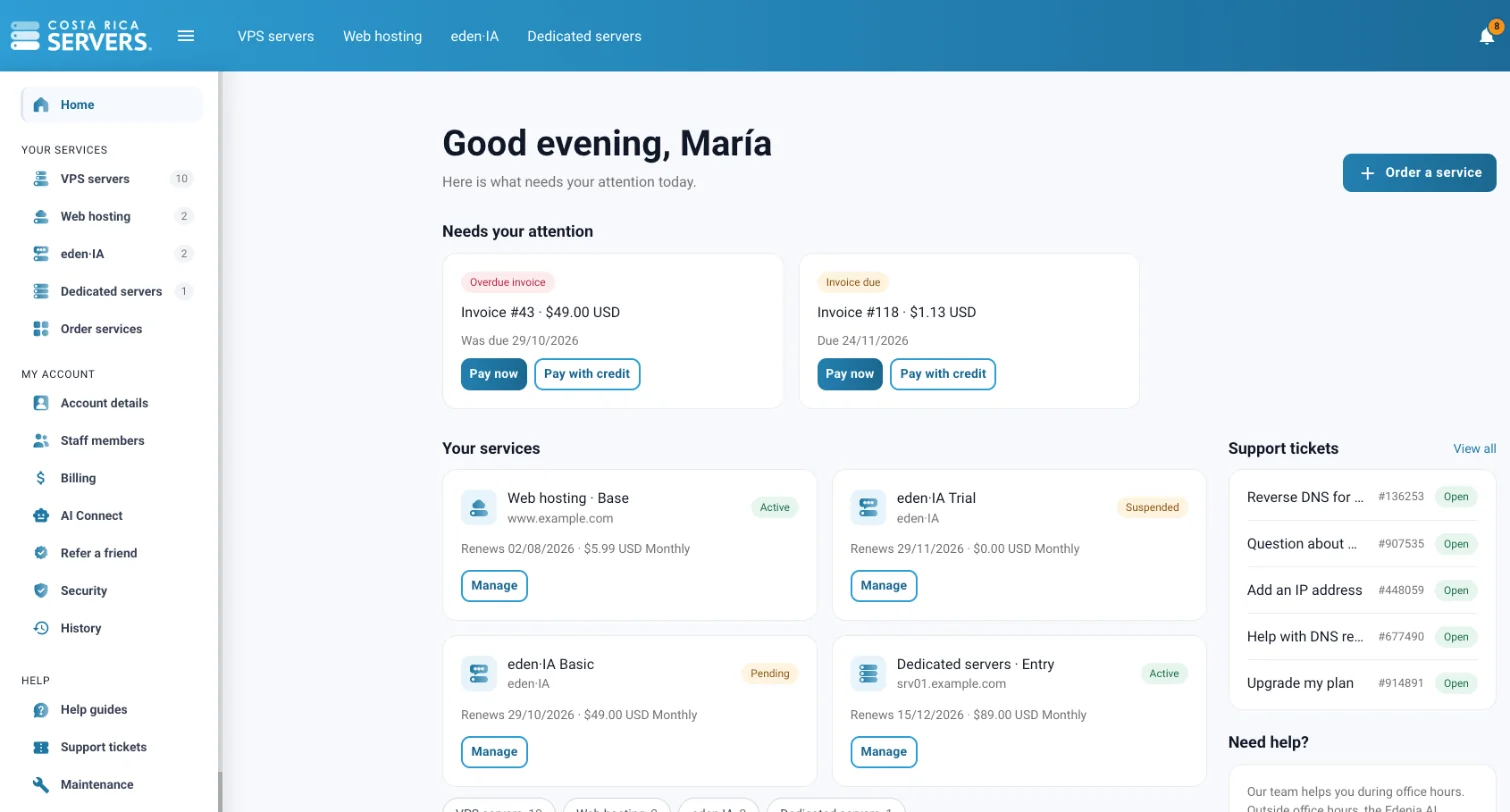
The sidebar
Everything starts from the menu on the left. On a phone, tap the menu icon (☰) at the top to open it.
| Sidebar item | Use it for |
|---|---|
| Home | What needs your attention today: unpaid invoices, upcoming renewals and new ticket replies |
| Your services | One entry per type of service you have, with a count: for example Virtual private servers, Web hosting or eden·IA |
| Domains | Domains registered or transferred with CR Servers |
| Order services | Order a new service |
| Refer a friend | Your referral link and the credit you have earned |
| Account details | Your profile, email, password, security and staff members |
| Billing | Invoices, payments, credit and transactions |
| AI Connect | AI assistants connected to your websites (how it works) |
| Security | Allowed IP addresses, SSH keys and multi-factor authentication |
| History | Account activity log and a copy of the emails we sent you |
| Support tickets | Open a ticket and follow your replies |
| Maintenance | Scheduled maintenance (how notices work) |
| Terms of service | Contracts and service documents |
| Live Chat | Write to our team from the client area |
Find a service
- In the sidebar, under Your services, click the type of service (for example Web hosting).
- The list shows each service with its status, price and Next renewal date. Lists with more than five services also have status filters.
- Click Manage to open the service. The ⋮ button next to it has quick actions such as Edit label, Upgrade and Request cancellation.
At the top of every page, the breadcrumb (for example Home / Web Hosting) takes you back one level.
Each service page starts with a summary card: name, status, renewal date and price. Below it are the tabs for that service. Step-by-step guides:
- VPS: Manage your VPS from the client area
- Web hosting: Open the web hosting control panel
- Domains: Manage your domains in the client area
- All service types at a glance: What you can do with each service in the client area
Can't find a service? It may be under another account or a contact's login. Open a ticket and we will check.
Typical tasks
- Pay: How to pay an invoice
- Protect your account: Account security, two-step sign-in and staff members
- Cancel a service: Request a cancellation
- Get help: How to open a support ticket
- Recommend us: Refer a Friend: share your code and earn credit